Wiki
blender / Home
Welcome
Welcome to Thorium Blender integration wiki!
Installation
Download package and copy addons directory content to your Blender addons directory (Blender/2.77/scripts/addons).
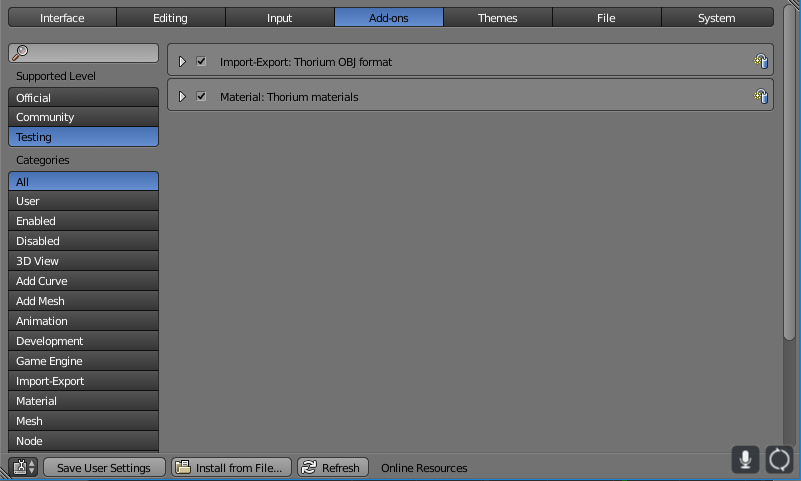
Enable Thorium add-ons
- Press Ctrl+Alt+U to open User Preferences or navigate to File -> User Preferences
- Open Add-ons tab
- Enable Thorium addons from Testing section:
 .
.
Managing materials
You can modify physical properties of objects materials using Blender Material tab. Multiple objects can share the same material (as usual in Blender).
There are two sections: Thorium shell and Thorium Optical.
Shell is a material object made from. Shell properties are density, heat capacity, thermal conductivity and thickness.
Optical properties is an object "paint". Every shell has two sides, so optical properties should be defined for front and rear sides.
In Blender you can define face normal direction manually. But in Thorium engine normal direction (front and rear sides) are deduced from face vertices order. Thorium export add-on will try to export face vertices in correct order.
Managing temperatures and special properties.
Thorium object physical properties are accessible at Blender Physics tab.
The only physical property you can specify on object level basis is the object temperature. Temperature will be used during Thorium Task generation.
Also Thorium supports such thing as Heat source/sink. You can specify object heating or cooling (using negative numbers) power.
Exporting scene and task
Thorium export add-on is based on Blender built-in "Wavefront obj export" add-on. So it have a plenty of parameters to configure:
-
Triangulate Faces. Thorium engine support only triangle faces. So you should turn that on. Default is on.
-
Export Task. Usually you want export scene with objects temperatures. Also specify integration time interval in seconds.
-
Write Materials. Should be turned on. Default on.
As a result you will get several files:
-
OBJ with scene definition
-
MTL with materials definition
-
TASK (optional) with task definition
Have fun!
Updated